Keeping in Touch with Parents
Keeping in touch with your child's progress at secondary school can feel very different from what you are used to at primary school, so it's natural to wonder how easy it will be.
Parents tell us that communication is a real strength of Harris Lowe Academy Willesden. We know that communication and support between families and the school makes a real difference and we are committed to making it as strong as possible. We do this in small but meaningful ways, including by providing all Heads of Year with a work mobile phone so it is easier to keep in touch with them.
The Form Tutor – your first point of contact
Your first point of contact will be your child's Form Tutor, who will see your child daily and have an overall picture of their academic progress, attendance and wellbeing.
You will have your child’s Form Tutor's name and email address (the format is the same for all staff: initial.surname@harrislowewillesden.org.uk).
If you need to contact your child’s Head of Year, contact information is as follows:
- Ms H Shooble – Head of Year 7 (H.Shooble@harrislowewillesden.org.uk)
- Ms S Miah – Head of Year 8 (S.Miah@harrislowewillesden.org.uk)
- Mr E Saunders – Head of Year 9 (E.Saunders@harrislowewillesden.org.uk)
- Ms A Clarke – Head of Year 10 (A.Clarke@harrislowewillesden.org.uk)
- Mr J Daley – Head of Year 11 (J.Daley@harrislowewillesden.org.uk)
Further Information
General contact number: 020 8838 8700
Email: info@harrislowewillesden.org.uk
We aim to respond to all emails and telephone calls within 24 hours during the working week. If your question or concern is more specific (for example, about a particular subject) you may be directed to contact the relevant subject teacher or Head of Department.
For serious concerns, including safeguarding, you can contact:
Designated Safeguarding Lead: Ms. Hannah Heyes
Email: safeguarding@harrislowewillesden.org.uk
If you're not sure who to contact, please contact our reception on 020 8838 8700 or info@harrislowewillesden.org.uk and they will be happy to direct you to the right person.
We all want the very best for your child, and research shows that students thrive when parents and schools work in partnership. That’s why we have a Home-Academy Agreement – a simple summary of what you and your child can expect from us, and what we ask from you and them in return, so we can support their learning and wellbeing together.
You’ll find the Home-Academy Agreement HERE.
You will be invited to the school at least once a year for a Parents’ Evening, at which you will meet your child’s subject teachers to discuss academic progress, behaviour and overall wellbeing. We'll let you know well in advance when parents' evenings are planned, to make it as easy as possible for you to attend. You’ll be able to ask questions, raise concerns and gain a clearer understanding of the curriculum and expectations.
Parents’ evenings help to strengthen the partnership between home and school, helping parents support their child's learning more effectively, and encouraging students to stay engaged and motivated in their education. Dates for parents’ evenings are published in advance on the school calendar which can be found on the website.
All students in the academy are assessed regularly, with a formal assessment twice a year. These tests aim to develop students' exam technique and enable them to demonstrate depth of knowledge, critical thought and, for many subjects, their practical skills. Most importantly, they are used to help gauge progress. For more information, go to our Exams and Assessments page.
In order to keep you informed about your child’s progress, we will report back to you at two points during the academic year – one mid-year report and one end-of-year report. These reports will summarise the academic and non-academic progress your child has made.
Information evenings
These events have a specific focus to support students through their child’s educational journey. Examples include Meet the Tutor evenings, Introduction to 6th Form and Year 9 Options Evening.
School performances
These events are highlights within the school calendar and allow our students the opportunities to demonstrate their skills and abilities. Examples include our annual drama production and art exhibition, to which all are welcome.
Reward evenings
Every term parents and students are invited to celebrate the achievements of our students during the previous year.
Newsletters
So many fantastic things happen all across our academy – every school day! Our latest newsletters make it easy to keep in touch with the bigger picture of what’s happening at Harris Lowe Academy Willesden, and all the amazing things our students are doing.
All parents have access to the MyChildAtSchool app, which gives you instant access to important information like attendance, behaviour, timetable and reports – all in one place. Before your child joins the academy we’ll invite you to download the app and give you the necessary login inform. With real-time updates and secure messaging, it makes it easier to stay informed and involved in your child’s school life.
New users - My Child At School app (MCAS)
Parents/carers are also able to set up their account directly from the Parent Login screen (see the to parent guide).
https://www.mychildatschool.com/MCAS/MCSParentLogin
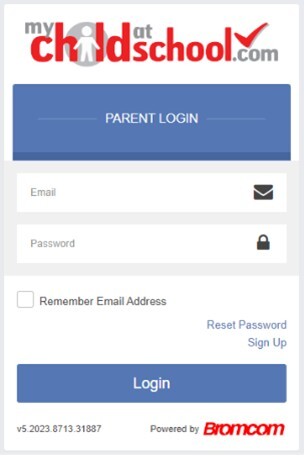
1. Select the Sign Up link (bottom right).
2. Enter the school's Postcode - NW10 3ST.
3. Select Harris Lowe Academy Willesden.
4. Click Continue
5. Enter your email address, this must be same email address you provided to the school.
6. Click Sign Up.
Once the checks are passed, you will receive the message 'To complete your registration, we have sent an email to the email address you provided. Please access your email and follow the steps to create your password'.
After verifying the code in the link you will be asked to create a password for the account. Parents/carers will then be able to login with their email address and password.
Adding siblings to existing MCAS app
Some of our parents/carers will already have an MCAS account if they have children at other schools or other year groups who are using it. If this is the case, you can add your child(ren) to your existing account.
Create an account for your child at Harris Lowe Academy as above, then
1. Login to your existing MCAS app or use the online browser.
2. Click on the Accounts button at the bottom of the app.
3. Click the Add Account button in the top right-hand corner.
4. Login using your newly created Harris Lowe Academy account using the School ID (14369) and your new account email and password.
5. Your child should then appear on the app.
6. To switch between your children, you can press the menu button at the top left.
If you have any issues, you can contact info@harrislowewillesden.org.uk.